For electricians and installation companies
Electrical installation estimates straight from drawings
Upload the project as PDF or DWG. Ascorio analyses the drawings, counts the sockets, switches, light fittings and other devices in every room, nearly 60 kinds in all, and prepares an estimate with your prices.
- No more counting symbols by hand
- Check every point on the drawing
- A PDF estimate ready for your client
- 1 estimate for free
Ascorio in numbers
- 200+registered electricians
- 1,100+projects analysed
- 100,000+electrical points detected
How it works
From drawing to estimate in four steps
- 1
Fill in your price list
Enter labour and materials prices for the items you do. You do it once, and every estimate is priced with them.
- 2
Upload the installation project
The whole project, as PDF, PNG, JPG, TIFF or DWG. Ascorio prices the electrical installation floor plans and leaves out the rest.
- 3
Make yourself a coffee
Ascorio reads the legend, marks the symbols on the drawing and counts them in their rooms. Usually in 10-15 minutes.
- 4
Check and send
Check the points on the drawing, recalculate the estimate and download a PDF for your client.
What Ascorio recognises
Not just sockets, lights and switches
59 kinds of device in 9 sections of the estimate, low-current systems included. Ascorio reads them from the project’s legend, marks them on the floor plans and counts them room by room.
Lighting
3 kinds
Ceiling and recessed light fittings, wall lights
Power and telecoms sockets
16 kinds
230 V and 400 V, weatherproof, EV chargers, RJ45, TV-SAT, floor boxes
Switches
7 kinds
Two-way, intermediate, double, dimmers, smart switches
Distribution boards and boxes
3 kinds
Main and sub-distribution boards, junction boxes
Earthing
5 kinds
Main earthing bar, test joints, earth electrodes
Safety and security systems
6 kinds
Smoke and CO detectors, motion sensors, alarm control panel, keypad and sounder
Air conditioning and heating
5 kinds
Thermostats, underfloor heating, boiler controllers, extractor fans, towel rails
Communication systems
8 kinds
Door entry phones, video door entry, doorbells, Wi-Fi, TV amplifiers and cabinets
Dedicated circuits
6 kinds
Oven, washing machine, tumble dryer, dishwasher, fridge, EV charger
Something not on the list? Ascorio marks a symbol it doesn’t recognise in red. You choose what it is, or add your own item to the estimate, such as cables in metres.
On the drawing
Check every counted point on the drawing
Choose a symbol to see how it was counted and which estimate item it’s in. Confirm the uncertain ones, add the missed ones, and the quantities change at once.
Try it on a sample plan:
- Choose a symbol
- Confirm an uncertain one
- Add a missed symbol
- Recalculate the estimate
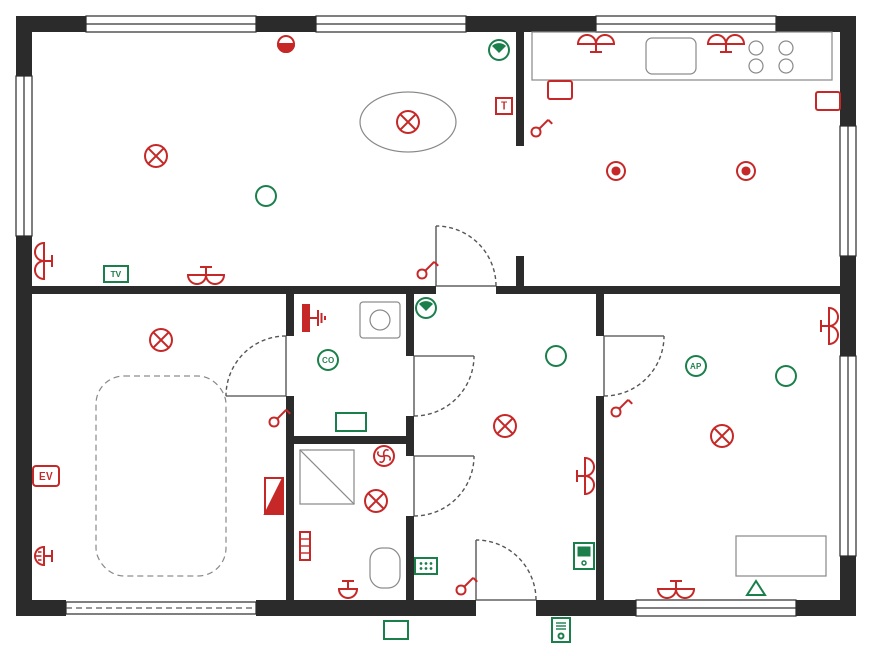
The plan opens full screen, as in the app on a phone.
- Counted
- Uncertain: confirm or change
- Unrecognised: choose what it is
- Corrected or confirmed
- Added by you
This is how drawings look after Ascorio’s analysis.See your own project counted point by point.
Try it freeEstimate
An estimate in your prices, ready to send to your client
Items in sections, as in an estimate made by hand, with quantities, net prices, markup and VAT.
- Only your prices
Labour and materials from your price list. For an unusual job, change a price in that project only. - Every quantity to check
Expand an item to see how many there are in each room. “Show on drawing” takes you to its points. - Items from outside the drawing
Add cables in metres or measurements with a test report, and recalculate the estimate. Recalculating doesn’t use up an estimate. - A ready PDF
With your company’s details, the client, the site address, how long the quote is valid and your terms.
Detached house, Wieliczka
Part of the estimate
| Item | Quantity | Unit | Net unit price | Net value |
|---|---|---|---|---|
| Safety and security systems3 items | PLN 1,260.00 | |||
Smoke detector Show on drawing | pcs | pcs | PLN 200.00 | PLN 600.00 |
| ||||
Carbon monoxide detector (CO) | pcs | pcs | PLN 240.00 | PLN 240.00 |
Motion sensor | pcs | pcs | PLN 210.00 | PLN 420.00 |
| Power and telecoms sockets1 item | PLN 700.00 | |||
EV charger socket / wallbox | pcs | pcs | PLN 700.00 | PLN 700.00 |
| Net total | PLN 1,960.00 | |||
| VAT 23% | PLN 450.80 | |||
| Gross total | PLN 2,410.80 | |||
Pricing
Start free, choose a plan when you price more
Net prices per month. Change or cancel your plan at any time.
Free start
To try Ascorio on your own drawings
PLN 0
the starter estimate doesn’t expire
- 1 free estimate to start
- 1 analysis at once
Start
A few jobs a month
PLN 99 net / month
PLN 121.77 incl. VAT
- 5 estimates a month
- Up to 2 analyses at once
- PLN 19.80 net per estimate
Pro
A steady flow of jobs
PLN 179 net / month
PLN 220.17 incl. VAT
- 10 estimates a month
- Up to 3 analyses at once
- PLN 17.90 net per estimate
Business
A team estimating every day
PLN 359 net / month
PLN 441.57 incl. VAT
- 30 estimates a month
- Up to 5 analyses at once
- PLN 11.97 net per estimate
Questions
Frequently asked questions
Which devices does Ascorio recognise?
59 kinds in 9 sections: lighting, sockets (including 400 V, weatherproof, RJ45, TV-SAT and EV chargers), switches, distribution boards, earthing, safety systems with alarms, heating and ventilation, door entry phones and Wi-Fi, and dedicated circuits. A symbol outside this list is marked as unrecognised, and you add its item to the estimate yourself.
Which drawings can I upload?
The whole building project, as PDF, PNG, JPG, TIFF or DWG: Ascorio prices the electrical installation floor plans with a symbol legend and leaves out the drawings of other trades. A project contains either PDF and image files or DWG drawings.
What if the analysis misses a symbol or reads it wrong?
Correct it on the drawing: choose the point and pick the right type or leave it out of the pricing, and add a missing symbol where it is with “Add symbol”. The quantities change at once, and one button recalculates the estimate. Recalculating doesn’t use up an estimate.
How long does pricing take?
Usually 10-15 minutes, depending on the number of pages and the load. You can close the page meanwhile: you’ll see the result in the project.
Where do the prices in the estimate come from?
Only from your price list: the labour and materials of each item, plus the markup and the VAT rate. You can change prices at any time, even after the estimate is prepared: just recalculate it.
Can I change a price in just one project?
Yes. For a small quantity or an unusual job, you can change an item’s unit price in that project only. Your price list stays as it is.
Price your first project for free
1 estimate to start. See your own drawings with their points marked.
Try it free